How to Connect HyperEVM to MetaMask
Learn how to connect HyperEVM to MetaMask using ChainList or manual RPC setup. This guide covers mainnet and testnet details, supported wallets, and what HyperEVM enables beyond Hyperliquid’s perp DEX.

Disclosure: Coinperps may earn a commission from partner links, at no extra cost to you. Reviews are based on independent testing, see how we test.
- HyperEVM is Hyperliquid's smart contract layer. It shares state with the on-chain order book (HyperCore), so dApps can read live trading data and route actions back into it.
- Connect it in MetaMask through ChainList or by adding the mainnet network manually (RPC URL: https://rpc.hyperliquid.xyz/evm, Chain ID: 999, Symbol: HYPE).
- Adding the network unlocks HyperEVM dApps such as lending markets, liquid-staking tokens and vaults. MetaMask Perps, the wallet's built-in Hyperliquid-powered trading feature, is separate and needs no network setup.
- Gas is paid in HYPE. Fund it by transferring HYPE from HyperCore to the EVM, or by bridging from another chain.

Hyperliquid
Hyperliquid is the largest and most liquid decentralized perpetuals exchange, processing over $2 trillion in volume on a custom Layer-1 with sub-second finality.
Features
Fees
Regulation
Overall
If you trade on Hyperliquid's perp DEX, you know the chain was built for speed and liquidity. Since HyperEVM went live in February 2025, the ecosystem has grown past trading into lending, liquid staking, stablecoins and on-chain strategies that settle against the same liquidity. By 2026 it ranks among the top chains by stablecoin supply, with most value held in a handful of native protocols (DefiLlama).
Adding HyperEVM to MetaMask opens that wider stack. Once the network is live in your wallet, you can move between its dApps, explorers and contracts directly. This guide covers the setup, funding gas, and where MetaMask's newer in-app trading fits in.
How to Connect HyperEVM to MetaMask
ChainList is the cleanest route. It is a verified directory of EVM networks that publishes official RPC endpoints, chain IDs and currency settings, so you never copy details from an unverified source or risk connecting to a malicious RPC.
- Open ChainList.org and connect your MetaMask wallet.
- In the search bar, type HyperEVM or Hyperliquid.
- Select the network and click Add to MetaMask.
- MetaMask shows the RPC URL, Chain ID and symbol. Check they match the values below before approving.
- Approve the request and confirm the network switch.
💡 Important Note: Adding the network lets you use HyperEVM dApps that connect to your wallet. It does not set up perpetuals trading. Perp positions and HLP vault actions live on Hyperliquid's order book (HyperCore), which MetaMask reaches through a separate feature covered below.

HyperEVM RPC Details (Mainnet)
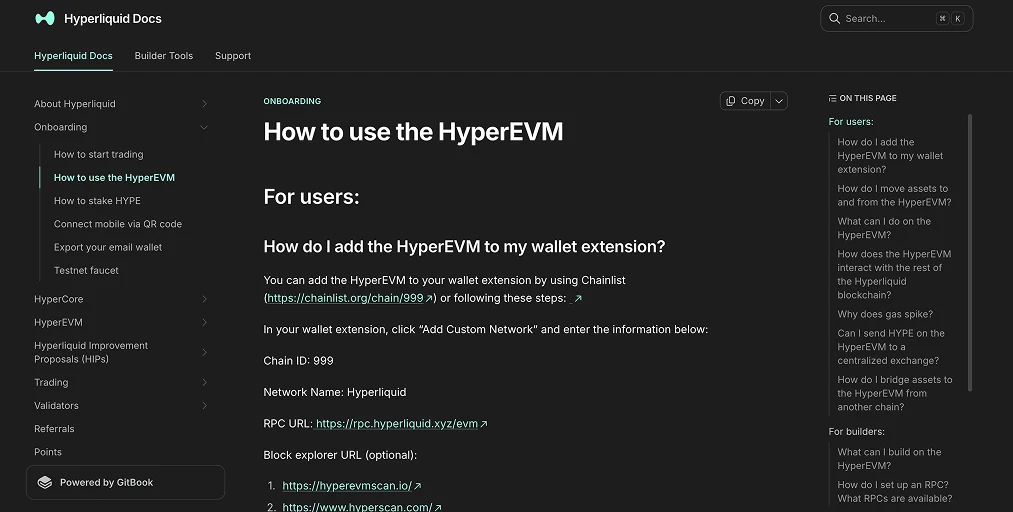
To add HyperEVM manually, open Settings → Networks → Add a network manually and enter:
- Network Name: Hyperliquid (HyperEVM)
- RPC URL: https://rpc.hyperliquid.xyz/evm
- Chain ID: 999
- Currency Symbol: HYPE
- Block Explorer: https://hyperevmscan.io
These match the Hyperliquid documentation, which now lists hyperevmscan.io and hyperscan.com as explorers. If you set this up earlier with a different explorer, update it.
For redundancy if the main RPC goes down, you can add a third-party endpoint:
- https://hyperliquid.drpc.org
- https://rpc.hypurrscan.io
- https://rpc.hyperlend.finance
These may carry different rate limits, so keep the official RPC as your default.
HyperEVM RPC Details (Testnet)
For testing and development, use the testnet settings:
- Network Name: HyperEVM Testnet
- RPC URL: https://rpc.hyperliquid-testnet.xyz/evm
- Chain ID: 998
- Currency Symbol: HYPE
- Block Explorer (Testnet): https://testnet.purrsec.com
You can connect the testnet directly from ChainList, where faucet HYPE covers gas. Big blocks are enabled by default here, which matters when deploying larger contracts (see the dual-block system below).
How to Get HYPE for Gas on HyperEVM
Most EVM networks pay gas in ETH. HyperEVM uses HYPE, so adding the network leaves you with zero gas until you fund a small balance.
- From HyperCore: If you already trade on Hyperliquid, buy HYPE with USDC, then move it using the EVM ⇄ Core Transfer button on the Portfolio page. Per the Hyperliquid docs, you can also send HYPE to its dedicated system transfer address to push it from Spot to the EVM.
- By bridging: Routes such as Stargate, deBridge, Gas.zip and Jumper move assets into the Hyperliquid network. A small amount of HYPE covers gas while you set up.
💡 Important Note: That dedicated transfer address accepts HYPE only. Send any other asset and it can be lost permanently, since each spot asset has its own transfer address. Test a small amount the first time you try any new transfer or bridge.
Everyday actions need only a modest HYPE buffer. HyperEVM runs an EIP-1559 fee model, and unusually it burns both the base fee and the priority fee, removing them from supply rather than paying validators.
MetaMask Perps vs Adding HyperEVM: What's the Difference?
In October 2025 MetaMask added native perpetual futures powered by Hyperliquid, reachable from a Perps tab in the app. You fund a position with any EVM token, which auto-swaps to USDC at zero MetaMask swap fee, then trade 150+ markets across crypto, US stocks and commodities with up to 50x leverage. There is no KYC and no centralized exchange in the loop, and you keep custody throughout. This is the part people get wrong: Perps does not require you to add HyperEVM as a custom network. It routes to Hyperliquid's order book on its own.
What you set up depends on the goal:
- Use HyperEVM dApps (lending, liquid staking, vaults): add the network from this guide and pay gas in HYPE.
- Trade Hyperliquid markets inside MetaMask: open the Perps tab, no network setup, gas-free order execution.
💡 Important Note: MetaMask Perps is not available everywhere. At launch it excluded the US, UK, Ontario (Canada), Belgium and US-sanctioned regions. If you are blocked, see our guides on using Hyperliquid in the USA and the wider Hyperliquid restricted countries list. Active traders can also cut fees from the first trade with the Hyperliquid referral code.
Alternative HyperEVM Wallets to MetaMask
MetaMask is the common choice, but any wallet that supports custom EVM networks works with HyperEVM. Depth of support varies.
- Rabby Wallet integrates closely with HyperEVM, showing balances, dApp positions and clear transaction previews. Some users report its default gas limit for HyperEVM can be set too low, causing failures until adjusted.
- OKX Wallet is multi-chain with EVM compatibility. Add HyperEVM via custom RPC and use its dApp browser.
- Backpack supports HyperEVM alongside other major networks, with built-in swaps and bridging.
- Phantom, best known for Solana, has also added Hyperliquid-powered perps trading in-app.
- Hardware wallets (Ledger, Trezor, OneKey, Keystone) sign HyperEVM transactions through a browser extension like MetaMask or Rabby.
For anything beyond small balances, route idle funds to a hardware-backed address and keep the hot wallet for active signing.
What is the HyperEVM?
The HyperEVM is Hyperliquid's Ethereum-compatible smart contract layer. It runs beside the order book engine (HyperCore) under the same HyperBFT consensus and shares state with it directly, so contracts can read live positions and prices and trade against the order book. That gives DeFi the CEX-like execution AMM chains cannot match, which is why lending markets, vaults and liquid-staking tokens like HyperLend and Felix hold most of its value.
It also splits throughput across two block types: fast small blocks for everyday transfers and slower big blocks for heavy work like contract deployments. Gas is paid in HYPE, the native token, which hit an all-time high near $77 in mid-2026 as Bitwise and Grayscale ETFs launched.
Track live HYPE price and the latest Hyperliquid statistics for TVL, volume and ecosystem data.
Staying Safe on HyperEVM
HyperEVM inherits HyperBFT's security, so the network itself holds up. The real risk sits with the user. Even as headline wallet-drainer losses fell sharply in 2025, Scam Sniffer reported the drainer ecosystem stayed active, with signature phishing, fake approvals and address poisoning still hitting wallets across EVM chains. Early 2026 brought a coordinated campaign that drained hundreds of wallets across EVM networks in small amounts, alongside spoofed MetaMask "upgrade" emails pushing malicious approvals. The fixes are routine:
- Verify the RPC and Chain ID. Confirm Chain ID 999 and the official RPC URL before approving. A wrong or hostile RPC can route your activity through a malicious endpoint.
- Confirm the network before sending. HyperEVM uses the same 0x address format as Ethereum, but balances are network-specific. Check HyperEVM is selected first.
- Read every signature. Reject unexpected approvals, especially open-ended "unlimited" spending, and revoke approvals you no longer use.
- Use an address book, not history. Address-poisoning seeds your history with lookalike addresses, so paste from a trusted source.
- Test small first. Send a small amount on any new bridge, transfer or dApp before committing funds. The dedicated transfer address takes HYPE only.
- Guard your recovery phrase. No network, bridge or wallet will ask for it. Keep it offline.
Bottom Line
Adding HyperEVM to MetaMask is the fastest way into Hyperliquid's on-chain ecosystem beyond the perp DEX. Connect through ChainList or the manual RPC, fund a little HYPE for gas, and you have self-custodial access to its dApps, explorers and tools.
Remember the split. The network handles HyperEVM's smart-contract apps. The Perps tab trades Hyperliquid markets with no setup, where it is available. Keep both straight, mind the safety basics, and you are set to explore lending, liquid staking, vaults and whatever launches next.
Frequently Asked Questions
What is the HyperEVM Chain ID and RPC URL?
The mainnet Chain ID is 999 and the official RPC URL is https://rpc.hyperliquid.xyz/evm, with HYPE as the currency symbol. The testnet uses Chain ID 998.
Do I need to add HyperEVM to MetaMask to trade perps?
No. MetaMask's Perps tab is powered by Hyperliquid and works without adding the network. You only add the HyperEVM network to interact with on-chain dApps such as lending, liquid staking and vaults.
How do I get HYPE for gas?
Buy HYPE with USDC on Hyperliquid and move it to the EVM with the EVM ⇄ Core Transfer button, or bridge assets in from another chain. A small amount covers gas.
Which block explorer should I use for HyperEVM?
The Hyperliquid documentation lists hyperevmscan.io and hyperscan.com for the mainnet.
Is HyperEVM safe?
The network is secured by HyperBFT consensus, but most real-world losses come from phishing and signing mistakes. Verify the RPC and Chain ID, read every signature, revoke stale approvals, and use a hardware wallet for larger balances.
Is HyperEVM a Layer 1 or a Layer 2?
It is part of Hyperliquid's Layer 1, not a Layer 2 or a rollup. HyperEVM is the Ethereum-compatible execution layer built into the same chain as HyperCore under one HyperBFT consensus, so it settles natively rather than bridging to a separate base layer.