How to Deposit USDC on Hyperliquid (Fastest & Cheapest)
Find out how to deposit USDC on Hyperliquid using our step-by-step guide to secure the cheapest transfer rates & start trading perpetuals in under 2 minutes.

Disclosure: Coinperps may earn a commission from partner links, at no extra cost to you. Reviews are based on independent testing, see how we test.
- USDC is the main collateral for perpetual trading on Hyperliquid, so you have to bridge it to your account before opening any market positions.
- The fastest and cheapest way to deposit USDC on Hyperliquid involves using the Arbitrum bridge, but you can use alternative networks like Solana via Phantom wallet.
- You can troubleshoot most missing deposit issues by checking the 5 USDC protocol minimum or contacting the independent Unit team for asset recovery assistance.

Hyperliquid
Hyperliquid is the largest and most liquid decentralized perpetuals exchange, processing over $2 trillion in volume on a custom Layer-1 with sub-second finality.
Features
Fees
Regulation
Overall
Hyperliquid is a decentralized perps exchange that is running on its own Layer 1 blockchain where USDC is the main collateral for perpetual contracts. The platform provides sub-second trade execution and zero gas fees for traders who want CEX-level speed with full anonymity.
Onboarding to Hyperliquid requires connecting an EVM wallet, bridging assets via Arbitrum (or another chain), and signing a one-time approval to activate your account. Once your USDC is available, you can immediately trade perpetuals or enter spot markets without needing any network gas.
Follow this guide to fund your account correctly. 🔽
Can You Deposit USDC on Hyperliquid?
Yes, you can deposit USDC on Hyperliquid as it is the the primary collateral for trading perpetual contracts on the exchange. You must use the Arbitrum network to send funds directly into the protocol, provided you meet the 5 USDC deposit minimum.
Depositing USDC is necessary because the platform uses it to back your positions and cover trading results. While you can send assets like ETH or SOL, they require selling for USDC before you can trade most of the 100+ available perpetual markets.
How to Deposit USDC on Hyperliquid
The most reliable way to fund your Hyperliquid account involves funneling assets through the protocol's native bridge. After tracking over 200 deposits, we found the average time for USDC arrivals via Arbitrum was ~1 minute, which makes it both a quick and secure way to start your onchain perps journey.
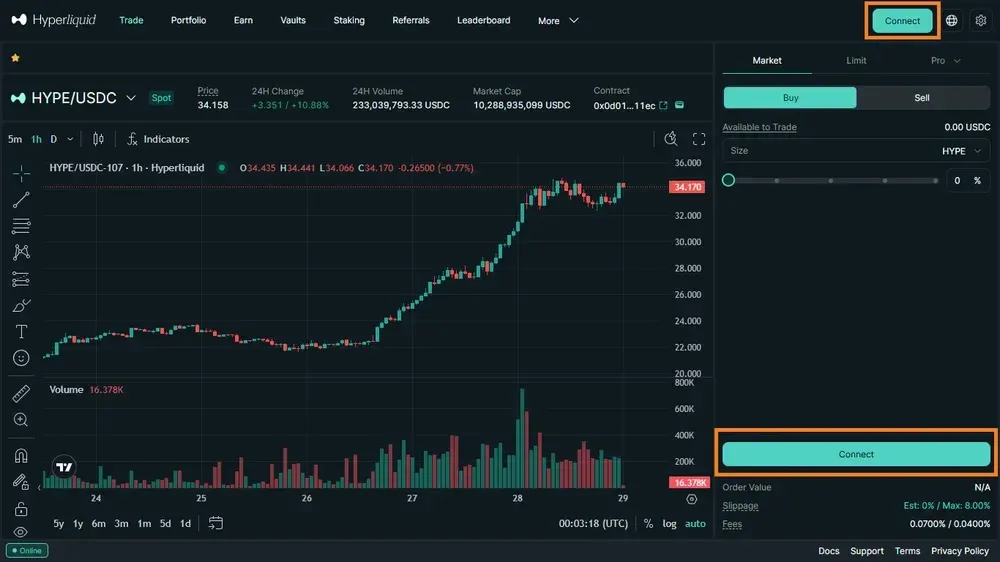
Step 1: Connect Your Trading Account
Access the official web interface and select your preferred login method. You can use an EVM wallet or an email address to generate your credentials.
Establish a secure platform connection:
- Navigate to the app.hyperliquid.xyz trade page.
- Click the Connect button in the top right.
- Choose either a DeFi wallet or email login.
Step 2: Enable Trading and Sign Permissions
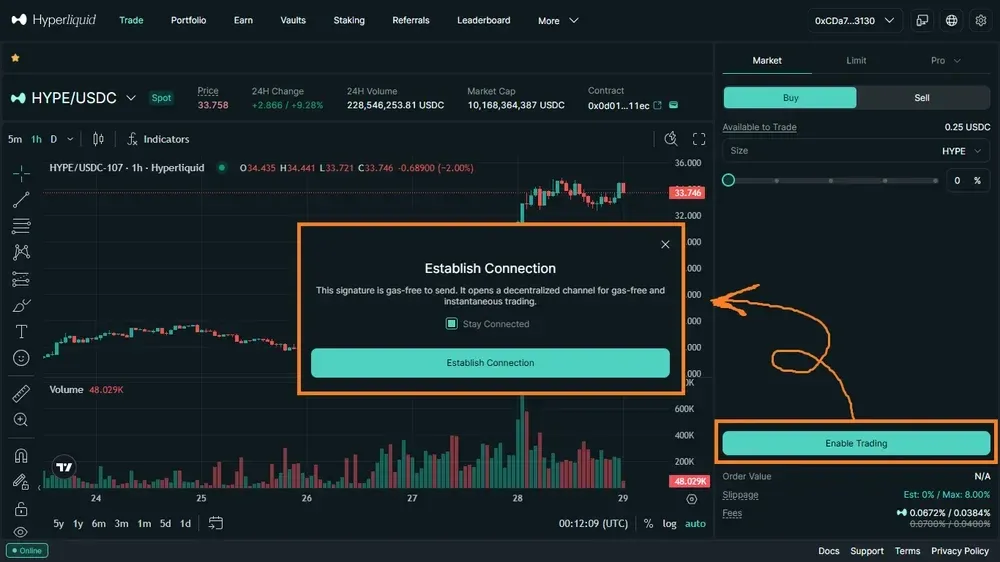
Before moving funds, you must authorize the interface to interact with the blockchain. This step involves a gasless signature to activate your specific profile.
Authorize the protocol for active trading:
- Click the Enable Trading button on the dashboard.
- Review the pop-up request in your browser extension.
- Sign the transaction to finalize your account activation.
Step 3: Initiate the USDC Deposit Request
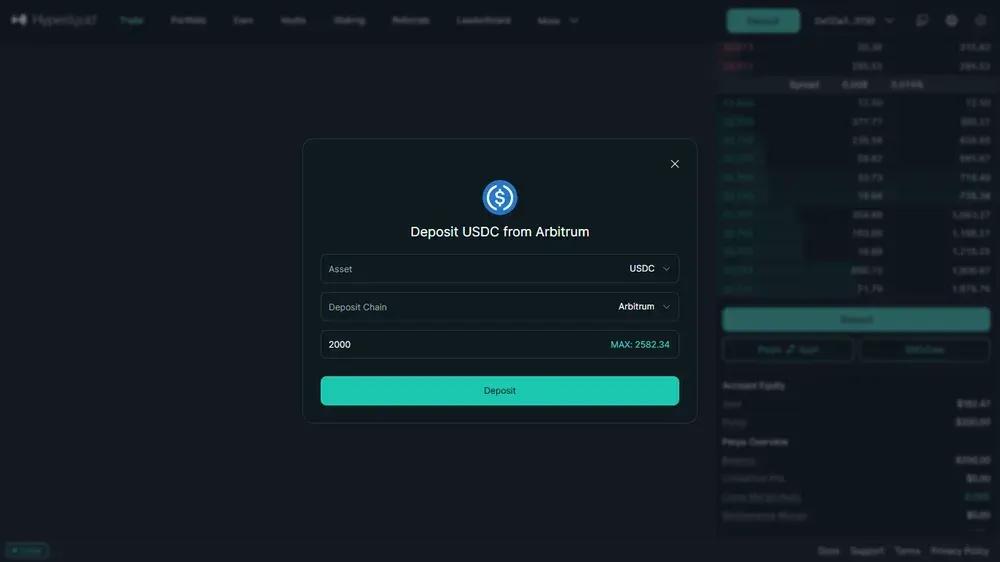
Select the appropriate network and asset to begin the transfer. Ensure you have a small amount of ETH for gas if using the Arbitrum bridge.
Configure your specific asset transfer details:
- Click the Deposit button located on the interface.
- Select USDC via the Arbitrum network option.
- Enter an amount of at least 5 USDC.
Step 4: Confirm and Verify Your Funds
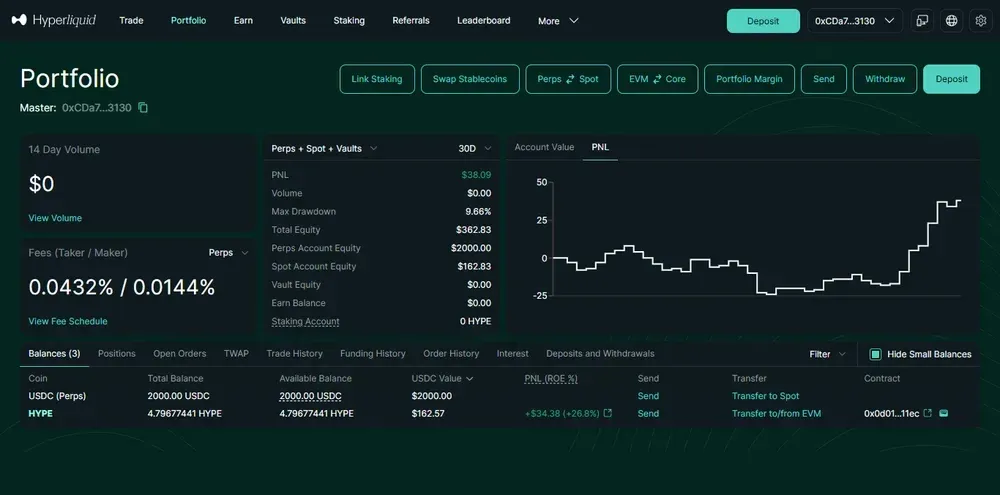
Review the transaction details in your wallet extension before finalizing. Once confirmed, your available balance will update after the blockchain processes the deposit request.
Finalize the transaction and check balance:
- Click Deposit and confirm in your wallet.
- Wait for the network to validate the transfer.
- Check your Portfolio page to see updated collateral.
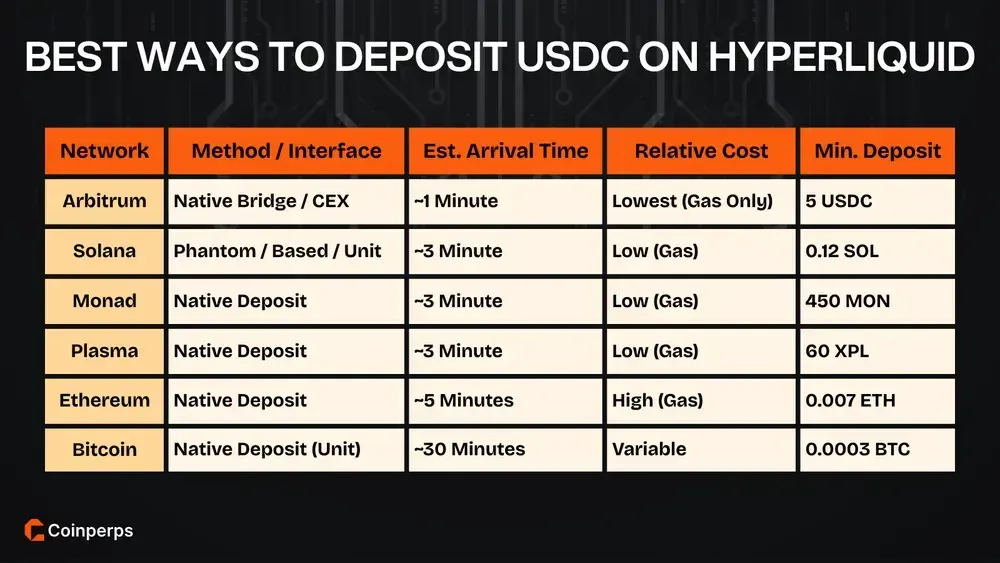
Fastest & Cheapest Ways to Deposit USDC on Hyperliquid
The Arbitrum bridge is the most practical route for funding your profile, though alternative networks offer flexibility for diverse asset holdings. Comparing arrival times and minimum thresholds ensures you select a path that minimizes slippage and overhead costs.
Note: Deposits made via Solana, Monad, Plasma, Ethereum, and Bitcoin arrive as the native asset and must be manually swapped for USDC within the Hyperliquid interface. For the absolute fastest entry, using Arbitrum USDC via a wallet like Rabby or MetaMask bypasses these extra conversion steps.
Alternative Ways to Deposit USDC on Hyperliquid
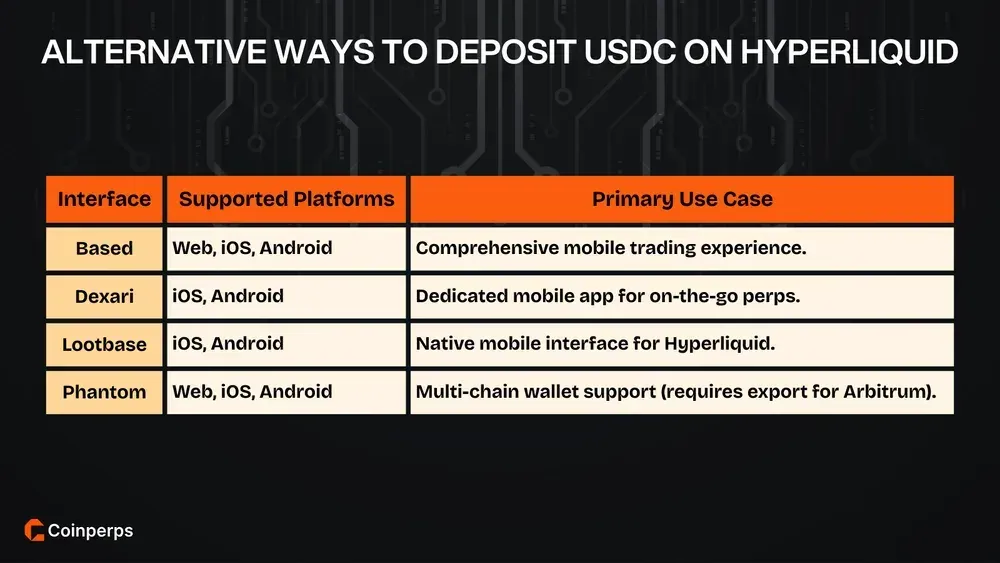
Hyperliquid supports several third-party applications and interfaces that streamline the onboarding process for mobile users. These platforms allow you to connect, deposit, and trade perpetuals directly from your smartphone while maintaining full control over your private keys and assets.
Step 1: Select Your Preferred Mobile Interface
Choose an application that fits your device and trading style. While the official web app is highly functional, mobile-native apps like Based or Dexari offer a more optimized user experience for smaller screens and touch interactions.
Choose and install a compatible trading app:
- Visit the official website of Based, Dexari, or Lootbase.
- Download the app from the iOS App Store or Google Play.
- Open the application to begin the setup process.
Step 2: Connect via Email or External Wallet
Most mobile interfaces allow you to log in using an email address for simplicity or link an existing mobile wallet. If using Phantom on mobile, ensure you are aware of its specific limitations regarding native Arbitrum support.
Link your identity to the mobile interface:
- Select the Connect option within the mobile app.
- Enter your email for a 6-digit code or choose "Connect Wallet."
- Follow the prompts to authorize the application on your device.
Step 3: Fund Your Account via Mobile Networks
Depositing on mobile follows the same logic as the desktop version, allowing for transfers from other wallets or centralized exchanges. You can send assets like SOL or BTC directly to the unique address generated for your account.
Transfer collateral to your mobile account:
- Locate the Deposit section within the chosen mobile app.
- Copy your unique deposit address for your preferred network.
- Send funds from your exchange or external wallet to this address.
Step 4: Manage Asset Conversion for Trading
If you deposited non-USDC assets such as SOL or ETH, you must swap them for USDC within the app's spot interface. This ensures your collateral is ready to back any perpetual positions you intend to open.
Convert deposited assets into USDC collateral:
- Go to the Spot or Trade section of the app.
- Sell your deposited tokens for USDC (minimum 10 USD value).
- Verify that your USDC balance is now available for perpetual trading.
How to Withdraw USDC from Hyperliquid
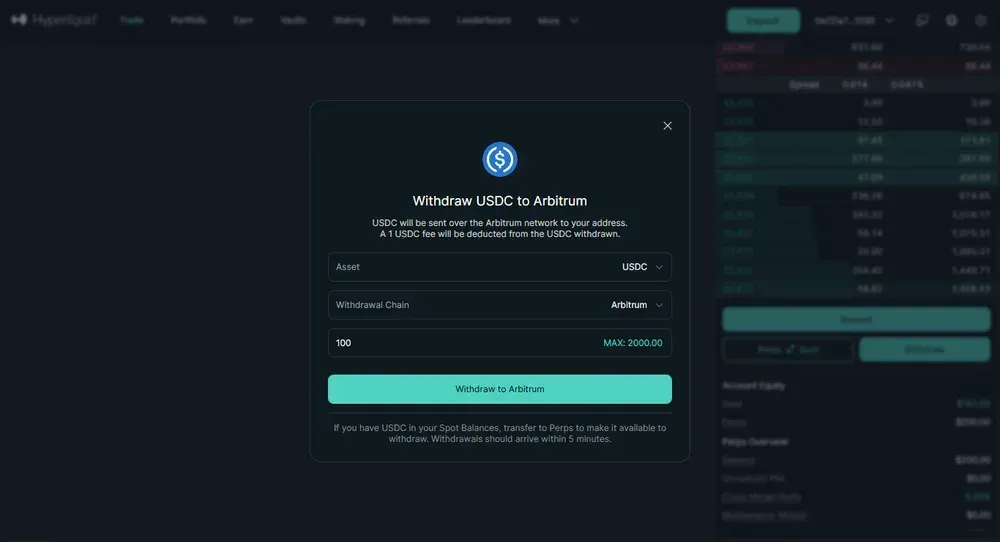
Withdrawing your USDC back to Arbitrum is a simple process. While the protocol covers the execution cost, you are responsible for a small, fixed administrative charge.
- Open the Exit Tool: Head to the main trading interface and select the Withdraw option in the bottom right corner.
- Define the Transfer: Input the USDC amount you want to bridge and confirm that Withdraw to Arbitrum is the active destination.
- Authorize the Release: Click the final button to trigger the transaction, which deducts a flat 1 USD fee from your total.
You can monitor the status of your request by visiting the Portfolio page and checking the Deposits & Withdrawals table. Once the status reads Completed, use the explorer link next to the timestamp to view the transaction hash on the Arbitrum chain.
Troubleshooting USDC Issues on Hyperliquid
Dealing with technical glitches involving USDC on Hyperliquid requires understanding the specific limits of the protocol’s multi-chain architecture. Most errors stem from ignoring minimum deposit thresholds or using unsupported networks.
1. Deposit Issues
Depositing fails if you ignore protocol minimums or use incorrect assets. These specific errors can lead to stuck or permanently lost tokens depending on your account type.
- Minimum Threshold Violation: Deposits below 5 USDC are not credited; email users can recover them by sending more, but DeFi wallet users lose these funds.
- Unsupported Asset Transfers: Sending USDT, ARB, or DAI via the Arbitrum bridge will result in a failed deposit that does not show in your account.
- Network Mismatch Errors: Your funds will not arrive if you send USDC from networks other than Arbitrum, such as Base or Polygon, to your bridge address.
- Insufficient Gas Fees: You must hold a small amount of ETH on the Arbitrum network to pay for the initial deposit transaction or asset approval.
- Email Wallet Recovery: If you deposited the wrong asset using an email login, you can retrieve it by exporting your private key to a wallet like Rabby.
- Unit Team Intervention: For failed deposits involving BTC, ETH, or SOL from external chains, you must contact the independent Unit team for manual recovery assistance.
2. Transfer Issues
Discrepancies in your visible balance often stem from how the protocol allocates collateral to active positions or separates internal wallets rather than actual fund loss.
- Negative Unrealized P&L Offset: New deposits may immediately cover negative unrealized P&L on open cross-margin positions, making your available balance appear lower than expected upon arrival.
- Wallet Segment Confusion: Assets are often split between the Spot and Perps buckets; check both sections to ensure your funds aren't simply sitting in the wrong interface.
- Internal Processing Lag: High network activity on the Hyperliquid blockchain can occasionally cause a delay in how your balance updates after moving assets between internal wallets.
- Quote Asset Conversion Requirements: Depositing non-USDC assets requires you to sell them for USDC in the spot market before they can be used as collateral for perps.
3. Withdrawal Issues
Most withdrawal problems occur when users confuse internal platform transfers with external blockchain bridging or fail to account for fixed protocol costs during the process.
- Send vs. Withdraw Trap: Using the "Send" function only transfers assets to other Hyperliquid users; you must use the "Withdraw" button to move funds back to Arbitrum.
- Fixed Protocol Fee: Every withdrawal incurs a flat 1 USD fee; if your account balance is exactly the amount you wish to withdraw, the transaction will fail.
- Centralized Exchange (CEX) Loss: Using the "Send" feature to a CEX address is irreversible and requires the exchange to integrate the Hyperliquid blockchain to recover your funds.
- Phantom Wallet Compatibility: Phantom does not natively support Arbitrum; if you withdraw to a Phantom address, you must export your private key to Rabby to see the funds.
- Pending Explorer Status: If a withdrawal shows as "Pending," wait for the estimated time; if it stays stuck, verify the transaction status on the Arbitrum blockchain explorer.
- Automatic Re-deposit Bots: If you use a wallet connected to a Telegram bot, the bot may be configured to automatically re-deposit any incoming USDC to your account.
Can You Deposit USDT instead of USDC on Hyperliquid?
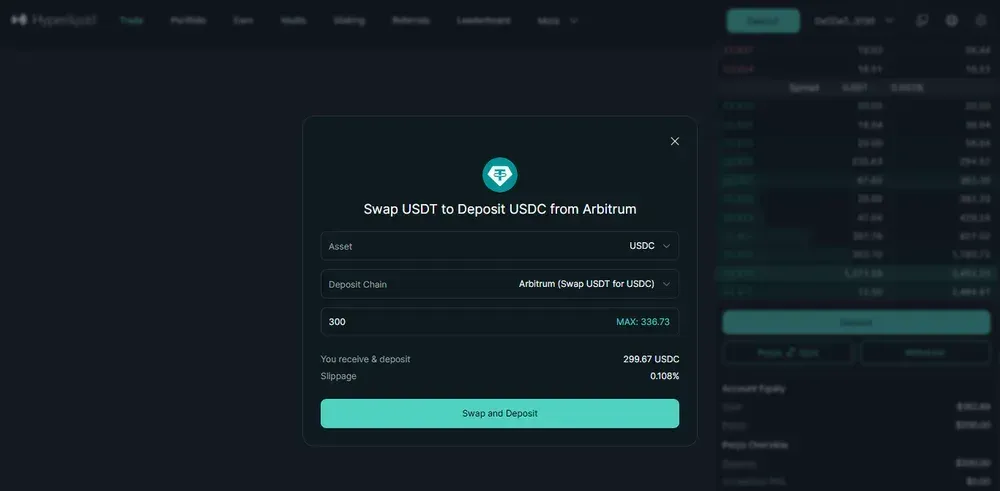
Yes, you can deposit USDT on Hyperliquid via the Arbitrum network, as the platform interface now supports multiple stablecoins. While you can send USDT directly, the protocol automatically converts these funds into USDC upon arrival to ensure they can function as trading collateral.
This internal swap happens during the bridge process, meaning you don't need to manually use a decentralized exchange before funding your account. Just be aware that a small conversion fee and slippage may apply depending on the current liquidity in the USDT/USDC spot pool.
Bottom Line
Depositing USDC via the Arbitrum network is the fastest and cheapest way to fund your Hyperliquid account and start trading perps immediately. You only need a small ETH balance for gas and at least 5 USDC to ensure your collateral is credited to your balance.
While you can use multiple chains like Solana or Bitcoin, these assets must be swapped for USDC on the platform before opening positions. Always use the Withdraw button rather than Send when exiting to avoid losing your capital to incompatible exchange addresses.